The Ask

Apply research methods from class and create detailed findings and recommendation reports.

Methods & Tools

Timeline

Year: 2015

Duration: 3 months

Final Video

Watch our 8 minute video that summarizes all our work.

Interviews

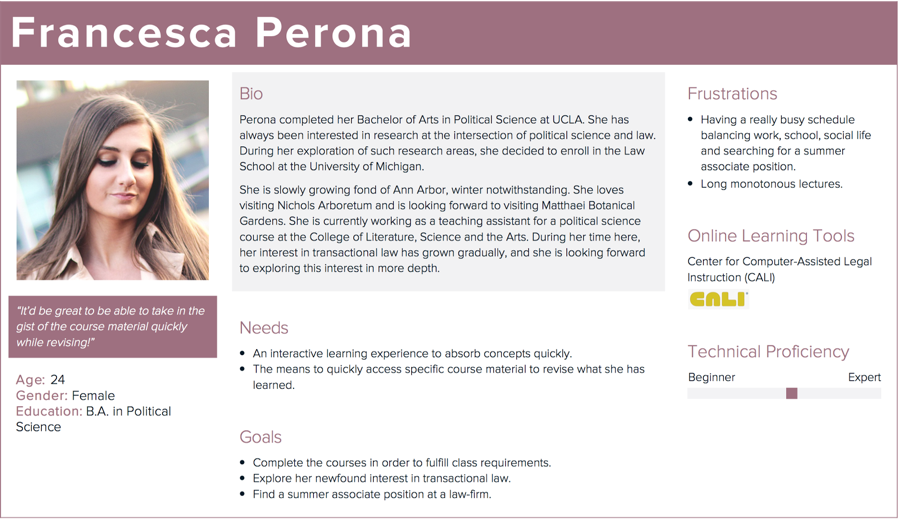
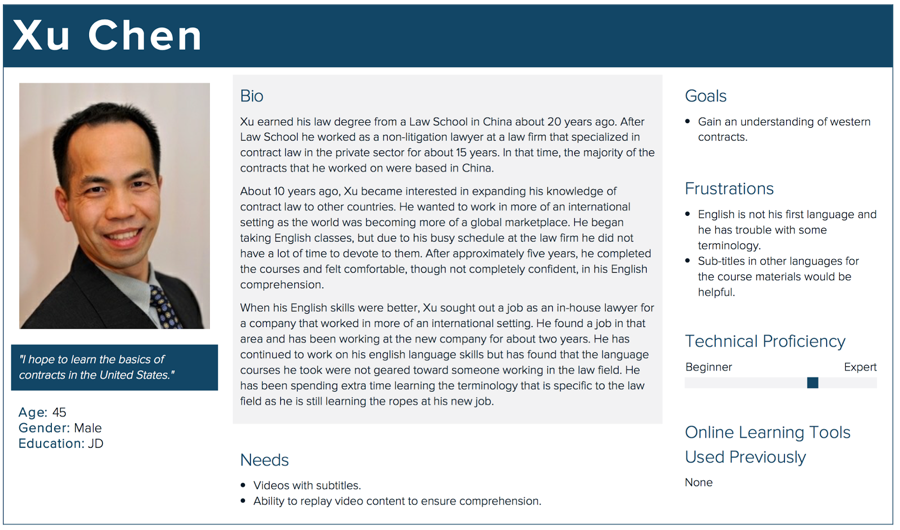
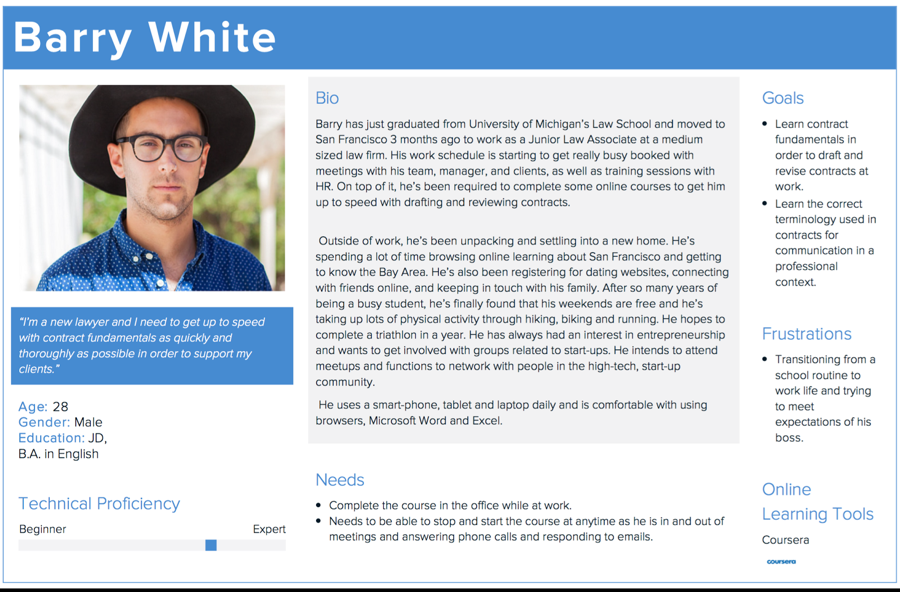
A total of six interviews were conducted: one with Praktio’s stakeholder and five with members of the tools’ target audience. Information from the stakeholder interview allowed us to identify Law students, junior attorneys in Law firms and International lawyers as the target audience of this tool.

Key findings:

Recommendations:

Personas

Comparative Analysis

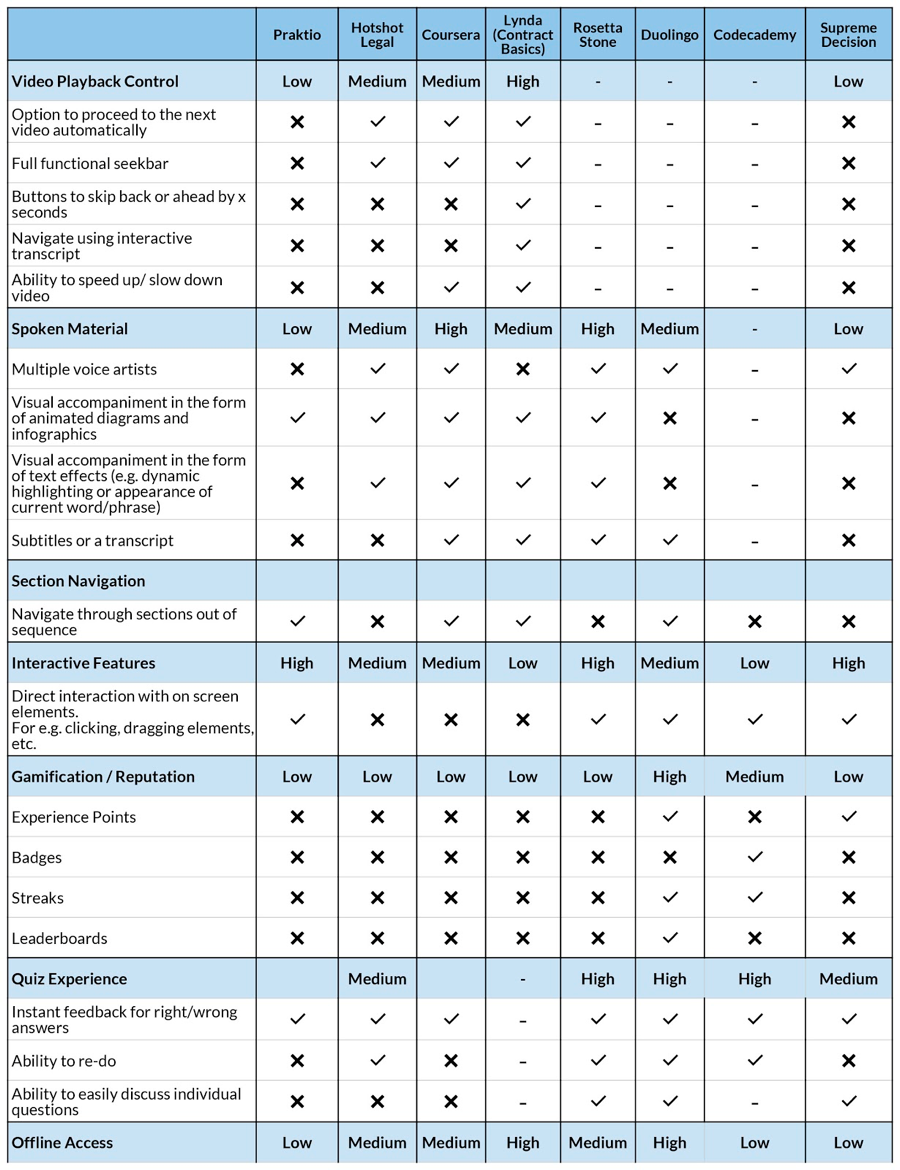
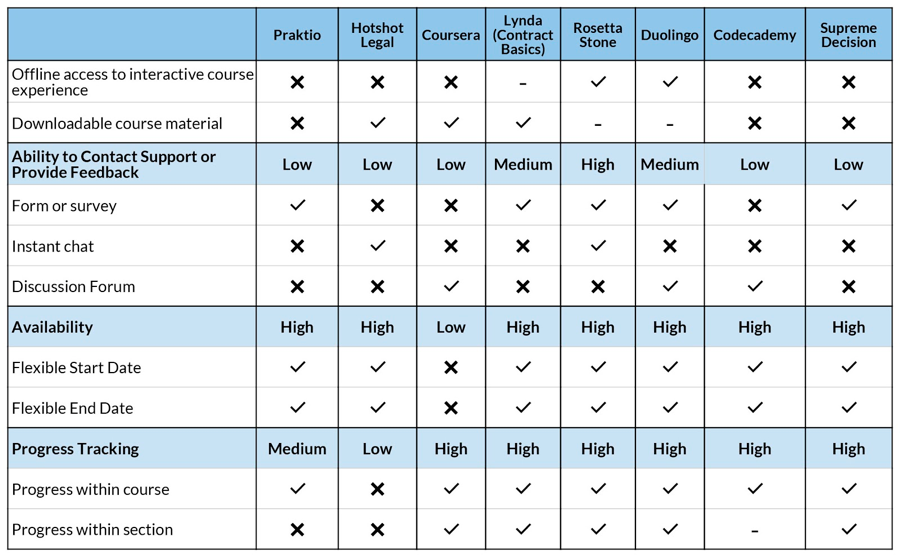
We conducted comparative analysis of Praktio against some direct, parallel and analogous systems on criteria such as the method of delivery (animation, video, audio) the level of control the user has over the playback of this content, interactive features, ease of navigation, and many others. As a result we have come up with several findings, and related recommendations:

  1. Video Playback
    During our interviews, we found that users required more control over video playback. Our analysis revealed that competing products had effective solutions in place for this, such as:
    • The option to proceed to the next video automatically
    • A fully functional seekbar
    • Buttons to skip back or ahead by x seconds
    • Navigate through video using interactive transcript
    • Ability to speed up/slow down video
  2. Audio Experience
    During our interviews, we found that users desired variety in the delivery of audio content to help keep them engaged. In addition, we found that most competing products had some form of subtitle or transcript system, which, if implemented would make the content on Praktio more accessible to a wider audience including non-English speakers, people with hearing impairments or even people whose learning style may be more visual than auditory.
  3. Visual Accompaniment
    Even though Praktio does a good job of incorporating visual accompaniment in the form of animated infographics and annotations, we found that users would prefer even more visual aids. Our analysis revealed that competing products used methods such as text animation effects (like dynamic highlighting or appearance of words currently being spoken).
  4. Progress Tracking
    Praktio allows a user to see their progress within a course from the main course overview page, but not consistently while navigating through actual course content. We found that competitors allowed a user to see how far along they were within a particular lesson, allowing one to better plan their time and in many cases, motivate them to proceed.

Survey

Our goal for the survey was to determine areas of improvement for the Praktio courses in order to improve its usability. Before we created the survey, we determined the following research questions:

We created a survey that focused on video playback features, online video usage, and use of other online learning tools.

We sent a survey to 190 previous Praktio users to evaluate their satisfaction with the different aspects of the platform. We anticipated the survey results would confirm findings from previous exercises; however, some of the results were unexpected.

Satisfaction

Findings:

Overall, people were satisfied with Praktio. Praktio has done a good job in satisfying its users and users are pleased with the courses.

The survey validated our findings from our Interviews, Personas, and Scenarios report that video playback control was the most important feature among users. However, our previous findings regarding the number of narrators used in the video were invalidated.

Recommendation:

Praktio course videos should incorporate the following features:

Visuals

Finding:

The survey responses validated our findings from the user interviews that users would like to see more dynamic visuals, especially during lengthy sections of audio.

Recommendation:

Update the visuals that accompany audio content to ensure the maintained attention of the user to coincide better with other online learning platforms.

Heuristics Evaluation

Heuristics evaluation is a cheap, fast and easy-to-use usability engineering method designed by Jakob Nielsen in 1994 to find usability problems in user interface designs.

Initially, our team of 4 met to agree that the scope and focus of our analysis should be the usability of the interface within each course as opposed to the main website prior to entering each course. We individually performed a heuristics evaluation of Contract Fundamentals and Precision Training. Afterwards, we met and consolidated our findings, recommendations and severity ratings. We discussed as a group and selected some key findings to highlight for the purpose of improving the usability of Praktio’s courses, as well as, document some good examples of heuristics that Praktio’s adhering to.

Findings and Recommendations:

Finding 1. No display to indicate the total time duration of a video and the real-time indicator of the play time that is left. Recommendation: Add information to the seekbar to indicate the total time of a video and time left to play.

Finding 2. No progress bar within individual modules. Recommendation: Add progress indicator within modules to give users feedback on how far they’ve progressed within a module.

Finding 3. Quiz results and attempts are not clear and understandable. In Contract Fundamentals, feedback on quiz attempts and total score are ambiguous. In Precision Training, there is no prominent feedback to signal that the user has used up their attempts. Recommendation: Present accurate information for quiz attempts and results in a location and a way that is easy to notice.

Finding 4. There is a disclaimer that the language in the course may not match the terminology used in law, but this violates the heuristic that the system should match with the real world. Recommendation: Update the content to match the users’ language and use terminology that is used in the real world.

Finding 5. No ability to seek in the video player. Recommendation: Provide more video playback control and allow users to click on the seekbar to jump to specific sections within a video.

Finding 6. Interactive web components (buttons, links) are not styled consistently. Non-clickable components are styled with underlines and shapes that look like buttons. Recommendation: Choose standard stylings for links and buttons and use them consistently throughout the courses.

Finding 7. Space bar takes you to the next video instead of pausing and playing a video. Recommendation: Make sure that shortcut keys like the space bar follow general standards in video players.

Finding 8. When you click on a module that you have already taken, the system asks if you would like to start over. Recommendation: This is good usability practice.

Finding 9. There is no indication on what you are clicking on in the Precision Training course. Recommendation: Consider having a hover feature to indicate specific sections of the quiz that are clickable.

Finding 10. There is no option to auto-play videos. Recommendation: Add an option to allow users to turn on auto-play of videos. This will give users control and not require them to click on the next button continuously.

Finding 11. There is information overload at the top of the page of the course modules page. Recommendation: Reduce the amount of text to show only relevant information and structure/organize it using visual styles to make the text more readable.

Finding 12. When you click on a bad link, the error screen is clear and has a link to go back to where you came from. Recommendation: This is good usability practice.


Usability Test

Five usability tests conducted on the Praktio (praktio.com) learning platform. The tests focused on the overall usability of the Praktio platform in order to determine those features that made the system easy or difficult to use.

Each usability test began with an introduction that explained the purpose of the test and gained the user’s consent to participate. Next, the user answered a series of pre-task questions related to their educational background and experience with online tools. The user was then presented with four tasks to complete in Praktio. Once completed, the user answered a post-task questionnaire and then was debriefed on the test. The debrief covered the entirety of the test and the moderator asked follow up questions about observations made during the task portion of the test.

Findings

Recommendations